|
Spam Block Software
<
Back
What is spam?
Spam is flooding the Internet with many copies of the same message,
in an attempt to force the message on people who would not otherwise
choose to receive it. Spam is the electronic version of junk mail,
and has been around since the Internet was created.
Most spam is commercial advertising, often for dubious
products, get-rich-quick schemes, or quasi-legal services. Spam
costs the sender very little to send -- most of the costs are paid
for by the recipient or the carriers rather than by the sender.
SpamAssassin
Spam Assassin, is a reputable spam filtering software
which is free of charge to all of our customers.
It scans and detects common characteristics of spam.
SpamAssassin can be activated on your website in your
control panel. You can configure SpamAssassin in 3 ways:
- Configure SpamAssassin to tag
suspicious email by adding SPAM to the message subject
line. This allows you to set rules in Outlook directing
all messages containing the tag into a separate folder.
(Refer to Outlook help files for how to create such filter
rules, use the "ORGANIZE" button at the top.) In this
case, you never see the spam in your inbox. You can check
the separate spam folder if you are missing legitimate email
which may have been tagged in error, and review/purge at your
leisure.
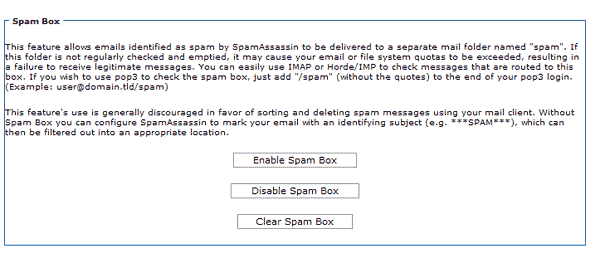
- You can enable a spam box in
your control panel and configure SpamAssassin to direct
suspicious email to it. This allows you to access the spam
folder at your leisure, or only if necessary. You must
empty your spam box on a regular basis. Excessive spam
storage will build up over time. If neglected, your
hosting account could exceed disk space quota, causing bounce
errors from your pop accounts.
To POP the spam box just add "/spam" (without the quotes) to the
end of your email login in Outlook (Example: name@mydomain.com/spam)
- Finally, you can configure
SpamAssassin to delete suspicious email entirely. No spam
filtering is 100% accurate. It is possible for legitimate email to be tagged
as spam in error.
How to Turn on Spam Assassin
This will not affect
your ISP's email address....only email directed to all pop accounts created in
your control panel.
1) Login to your control panel with your
username and password. (Your user name and password was sent to you
upon website launch).
Click here for instructions on how to login your control panel.
2) Click the MAIL ICON
3) Click
on
Spam Assassin from the list of links.
4) Enable spam assassin or enable spam box by
clicking on the appropriate box.
Please use the
help desk
if you have any questions.
For More Information about the software, visit the Spam Assassin website:
Spam Assassin
How to Pop Your Spam
Assassin Spam Box
If you have the Spam Box enabled in your
control panel and are using
SpamAssassin, below are instructions on how to pop all email
marked as spam using your email client:
Enabling the Spam Box allows emails identified as spam by SpamAssassin
to be delivered to a separate mail folder named "spam". If this
folder is not regularly checked and emptied, it may cause your
email or file system quotas to be exceeded, resulting in a
failure to receive legitimate messages.
To POP the spam box just add "/spam" (without the quotes) to the
end of your email login in Outlook (Example: name@mydomain.com/spam)
This feature's use is generally discouraged in favor
of sorting and deleting spam messages using your mail client.
Without Spam Box you can configure SpamAssassin to mark your
email with an identifying subject (e.g. ***SPAM***), which can
then be filtered out into an appropriate location.
Fighting Spam from your PC
There are many spam filtering services and/or software for your
PC which make it possible for you to use the same filtering method
locally, regardless of how many pop accounts you access, which may
be provided by one or more ISPs. (i.e.
personal@earthlink.com,
myname@blackberry.com,
sales@mydomain.com,
me@mydomain.com, etc)
These can include your personal ISP account, your wireless
provider's pop account, and all pop accounts created through your
website hosting account. This also allows you to make
a separate folder in Outlook and create rules where all
spam is sent to a central location (regardless of which account it
came from).
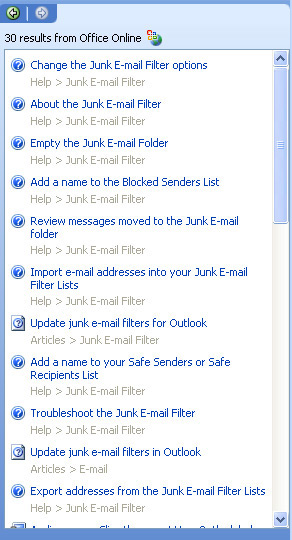
To learn more about how to setup junk email filters in
Outlook, click on the HELP menu, and search for the term "Junk
Email". Your results will be similar to the following image. The
Outlook help files give detailed information on how to filter
spam.
Please avoid posting your email addresses on any public
forums, or on the internet, as this invites them to be harvested
by spammers. If an email address is disclosed by
posting it anywhere on the internet (by shopping, or joining
various forums) the email address may be sold on one of many
spam lists which changes hands over and over. Unfortunately the
only thing you can do in this case, is to create a different pop
account, and delete the original, targeted address.
Email Address Encryption
If you have (or have had) a mailto link on your website, this
has made your email address vulnerable to malicious bots that
crawl the web collecting addresses to sell them in spam lists.
As a result, the amount of spam you receive may be getting out
of control, as these lists change hands over and over.
We offer mailto link encryption to put a stop to the process. This work is free of charge to all
standard and executive account service levels, and for a small
fee for basic business. If you have an email hyperlink published on your site,
and wish to have it encrypted, please open a ticket on our
help desk or email.
|






















